
<style>.product-container{font-family:Arial,sans-serif;line-height:1.6;color:#333;max-width:900px;margin:0 auto}.highlight-box{background:#f0f7ff;padding:15px;border-left:4px solid #1e3a8a}table{border-collapse:collapse;width:100%}td,th{border:1px solid #ddd;padding:8px}th{background:#1e3a8a;color:#fff}</style><div class="product-container">
<h1>AC1750 DBAND WI-FI RANGE ANTENNA</h1>
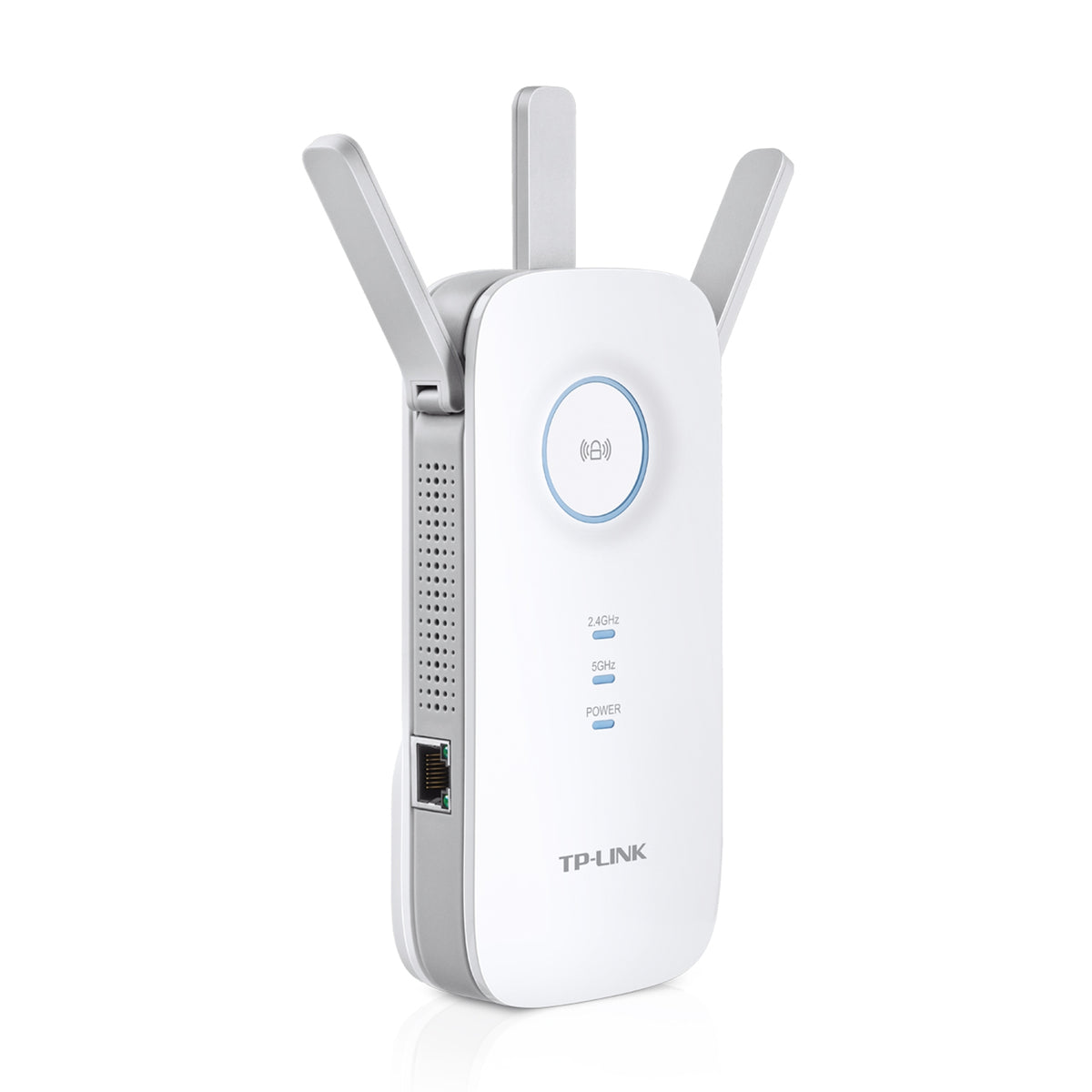
<div class="highlight-box"><strong>Key Features</strong><ul><li>AC1750 Dual Band Wi-Fi - Simultaneous 450Mbps on 2.4GHz + 1300Mbps on 5GHz</li><li>Three Antennas - Three adjustable external antennas provide optimal Wi-Fi coverage and reliable connections</li><li>Gigabit Ethernet port - Act as a wireless adapter to connect a wired device to your network at Gigabit speed</li><li>Intelligent Signal Light - Help to find the best location for optimal Wi-Fi coverage by showing the signal strength</li><li>AP Mode - Create a new Wi-Fi access point to enhance your wired network with Wi-Fi capability</li><li>TP-Link Tether App - Easily access and manage your network using any iOS or Android mobile device</li><li>Ultimate Compatibility - Extend the range of any Wi-Fi router or wireless access point</li><li>EasyMesh-Compatible - Flexibly creates a Mesh network by connecting to an EasyMesh-compatible router for seamless whole-home coverage</li></ul></div>
<h2>Product Description</h2><p>AC1750 Dual Band Wi-Fi - Simultaneous 450Mbps on 2.4GHz + 1300Mbps on 5GHz Three Antennas - Three adjustable external antennas provide optimal Wi-Fi coverage and reliable connections Gigabit Ethernet port - Act as a wireless adapter to connect a wired device to your network at Gigabit speed Intelligent Signal Light - Help to find the best location for optimal Wi-Fi coverage by showing the signal strength AP Mode - Create a new Wi-Fi access point to enhance your wired network with Wi-Fi capability TP-Link Tether App - Easily access and manage your network using any iOS or Android mobile device Ultimate Compatibility - Extend the range of any Wi-Fi router or wireless access point EasyMesh-Compatible - Flexibly creates a Mesh network by connecting to an EasyMesh-compatible router for seamless whole-home coverage Strong Signals in Every Corner If there’s a room where you can’t connect to the internet in your mid-size or bigger home, RE450 eliminates these dead zones. With three high-performance antennas, your WiFi transmits farther with stronger signals. RE450’s two bands (2.4 Ghz and 5 Ghz) also enable more reliable device connections. Flexibly Create Whole Home Mesh WiFi If you have any dead zones at home, just add another EasyMesh-compatible router/range extender to further form your whole home multi-gigabit mesh WiFi. No more searching for a stable connection. Quality Connections for Quality Experiences For more coverage in other areas of your home, simply plug in RE450 for fast and stable WiFi. Equipped with 3 chipsets, RE450 provides high-speed data flow to your phone and laptop. TP-Link’s Beamforming tech ensures the high-quality signal is sent directly to your end devices, bringing your WiFi strength to a new level. Lightning-Fast Speeds Whether you’re binging your favorite show at the highest settings or having a meeting with your entire department, RE450’s 6-stream dual-band WiFi provides speeds up to 1.75 Gbps. With two bands, connect more devices with MU-MIMO tech letting your whole family enjoy the same strength and speed at the same time. Reliable Gigabit Connection Sometimes wireless just doesn’t cut it. RE 450’s Gigabit Ethernet port supports data transmissions up to 1,000 Mbps, which is 10x faster than a fast Ethernet port (100 Mbps). This lets you enjoy peak performance for wired devices that need a constant stream of Gigabit internet. Easy Installation & Quick Position The extender RE450 works with any standard wireless router. Instantly connect the RE450 to a router by pressing the extender’s RE button followed by the router’s WPS button (if available). Once connected with an existing router, you can take RE450 anywhere within the wireless range of the existing router, no more further configurations. Smart Signal Indicator Find the best spot to extend your WiFi with just a glance. Control at Your Fingertips Set up and manage your WiFi through the TP-Link Tether app from your phone (Android, iOS), including TP-Link routers and range extenders. Specifications Working Modes Range Extender/Access Point Standards and Protocols IEEE802.11ac, IEEE 802.11n, IEEE 802.11g, IEEE 802.11b</p>
<h2>Main Benefits</h2><ul><li>Strong Signals in Every Corner</li><li>If there’s a room where you can’t connect to the internet in your mid-size or bigger home, RE450 eliminates these dead zones. With three high-performance antennas, your WiFi transmits farther with stronger signals. RE450’s two bands (2.4 Ghz and 5 Ghz) also enable more reliable device connections.</li><li>Flexibly Create Whole Home Mesh WiFi</li><li>If you have any dead zones at home, just add another EasyMesh-compatible router/range extender to further form your whole home multi-gigabit mesh WiFi. No more searching for a stable connection.</li><li>Quality Connections for Quality Experiences</li><li>For more coverage in other areas of your home, simply plug in RE450 for fast and stable WiFi. Equipped with 3 chipsets, RE450 provides high-speed data flow to your phone and laptop. TP-Link’s Beamforming tech ensures the high-quality signal is sent directly to your end devices, bringing your WiFi strength to a new level.</li></ul>
<h2>General Specifications</h2>
<table><tr><th>Specification</th><th>Details</th></tr>
<tr><td>Manufacturer</td><td>TPLINK</td></tr>
<tr><td>Product Name</td><td>AC1750 DBAND WI-FI RANGE ANTENNA</td></tr>
<tr><td>Model Number</td><td>RE450</td></tr>
<tr><td>EAN</td><td>'6935364092399</td></tr>
<tr><td>Product Type</td><td></td></tr></table>
<h2>Performance & Features</h2><table><tr><td>Feature</td><td>AC1750 Dual Band Wi-Fi - Simultaneous 450Mbps on 2.4GHz + 1300Mbps on 5GHz</td></tr><tr><td>Feature</td><td>Three Antennas - Three adjustable external antennas provide optimal Wi-Fi coverage and reliable connections</td></tr><tr><td>Feature</td><td>Gigabit Ethernet port - Act as a wireless adapter to connect a wired device to your network at Gigabit speed</td></tr><tr><td>Feature</td><td>Intelligent Signal Light - Help to find the best location for optimal Wi-Fi coverage by showing the signal strength</td></tr><tr><td>Feature</td><td>AP Mode - Create a new Wi-Fi access point to enhance your wired network with Wi-Fi capability</td></tr></table>
<h2>Technology Highlights</h2><table><tr><td>Technology</td><td>TP-Link Tether App - Easily access and manage your network using any iOS or Android mobile device</td></tr><tr><td>Technology</td><td>Ultimate Compatibility - Extend the range of any Wi-Fi router or wireless access point</td></tr><tr><td>Technology</td><td>EasyMesh-Compatible - Flexibly creates a Mesh network by connecting to an EasyMesh-compatible router for seamless whole-home coverage</td></tr><tr><td>Technology</td><td>Strong Signals in Every Corner</td></tr></table>
<h2>Ideal Applications</h2><ul><li>Lightning-Fast Speeds</li><li>Whether you’re binging your favorite show at the highest settings or having a meeting with your entire department, RE450’s 6-stream dual-band WiFi provides speeds up to 1.75 Gbps. With two bands, connect more devices with MU-MIMO tech letting your whole family enjoy the same strength and speed at the same time.</li><li>Reliable Gigabit Connection</li><li>Sometimes wireless just doesn’t cut it. RE 450’s Gigabit Ethernet port supports data transmissions up to 1,000 Mbps, which is 10x faster than a fast Ethernet port (100 Mbps). This lets you enjoy peak performance for wired devices that need a constant stream of Gigabit internet.</li><li>Easy Installation & Quick Position</li><li>The extender RE450 works with any standard wireless router. Instantly connect the RE450 to a router by pressing the extender’s RE button followed by the router’s WPS button (if available).</li></ul>
<h2>Package Contents</h2><ul><li>Package Content</li></ul>
<h2>Product Identifiers</h2><table><tr><td>Brand</td><td>TPLINK</td></tr><tr><td>Model</td><td>RE450</td></tr></table>
</div>
